A new free scam checker has been launched by the Co-operative Bank to help people spot suspicious texts, emails and websites before they lose money.
Skint Dad put the tool to the test using three suspicious messages, and it flagged all three as possible scams.

The bank announced the service on 7 October 2026 through a partnership with Ask Silver. While the tool can help identify warning signs, it cannot guarantee that a message or website is genuine.
Get a sign-up bonus with Swagbucks
Earn a bit of extra money in your spare time with surveys, offers and other simple tasks you can do at home.
New users can currently get a bonus when they sign up.
Claim sign-up bonus
What can the free checker look at?
The Co-operative Bank’s new scam-checking page lets customers submit a suspicious website link or a screenshot or photo of a text, email, letter or leaflet.
Ask Silver then uses technology, including artificial intelligence (AI), to look for warning signs.
The bank says the checker should return a result in less than 30 seconds.
Skint Dad has tested the checker with suspicious messages, but did not independently time its responses or test its overall accuracy.
Do you need to bank with the Co-operative Bank?
You don’t need to be a Co-operative Bank customer to use Ask Silver’s free public scam checker. The bank’s new version of the service is aimed at its own customers.
The Co-operative Bank describes its own new service as being offered to its customers.
Ask Silver’s privacy policy says its service is intended for adults aged 18 and over.
We tried the free scam checker with suspicious messages
Skint Dad tried the Co-operative Bank checker using examples of suspicious emails and a delivery text. It flagged every example we submitted in this small check with the warning “This could be a scam”.
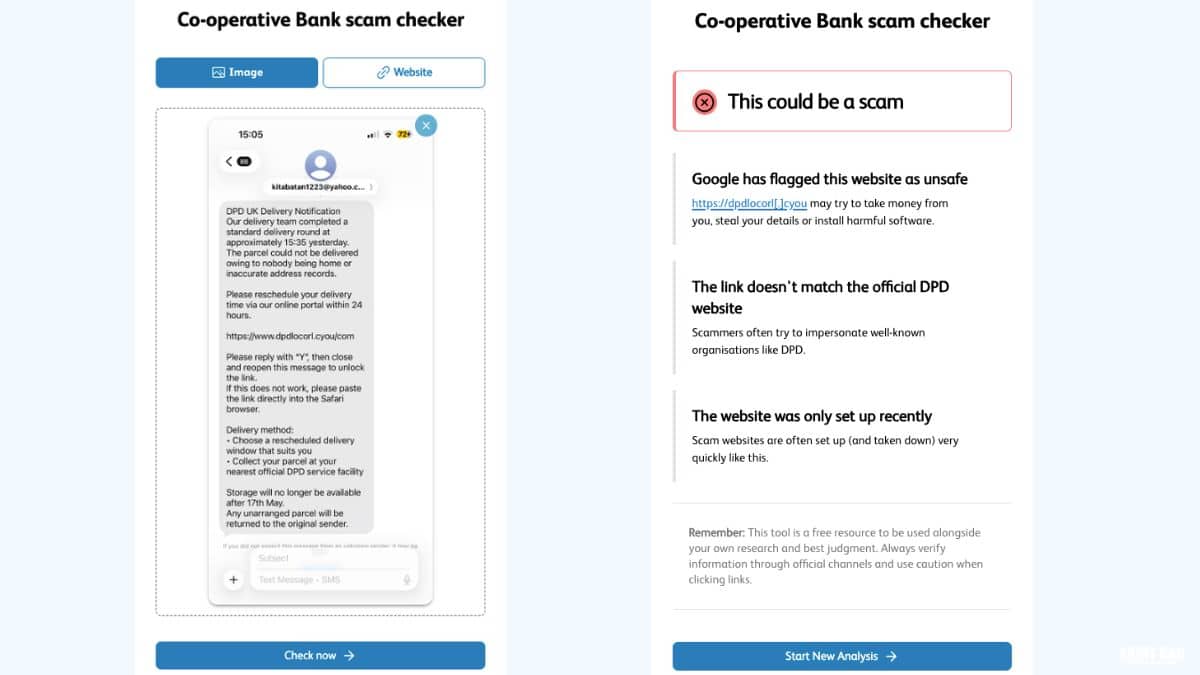
- A fake DPD delivery text was flagged for using a website link that did not match DPD, and the checker also reported that the website was newly created and had been marked unsafe by Google.
- An email claiming millions of dollars from the Warren Buffett Foundation was flagged for promising an unusually large amount of money and not addressing the recipient by name.
- A supposed €5.5 million compensation email was also flagged. However, the checker asked whether we had entered a lottery or giveaway, even though the email claimed to be about compensation.
That last result is a useful reminder: the warning may be right even when part of the explanation does not quite fit.
We tried obvious suspicious examples, not a balanced mix of genuine and fraudulent messages, so these results do not show how accurately the checker works overall.
Always check independently before clicking a link, sharing details or sending money.
How to check a suspicious message safely
- Don’t click the link in the unexpected text or email. Open the checker separately using its official website.
- Paste the suspicious website address into the checker, or upload a screenshot or photograph of the message. Remove personal details first.
- Read the result, but check independently too. If the message claims to come from your bank, delivery firm or another company, contact that organisation through its official app or a phone number you already trust.
A warning before uploading screenshots
Do not upload bank account or card numbers, your address, phone number, email address or anyone’s photograph. These may be visible in a screenshot without you noticing.
Ask Silver says submitted content can be used to improve and train its systems, so it is worth reading its privacy policy before using the service.
Its own AI disclaimer makes clear that results are not guaranteed to be correct. A message marked as safe is not proof that it is safe.
What if you have already been scammed?
If you have paid someone you believe is a fraudster or shared bank details, contact your bank immediately. Do not wait for a scam checker’s result.
You can also report suspected fraud to Report Fraud if you are in England, Wales or Northern Ireland, or to Police Scotland on 101 if you are in Scotland.
If you received a suspicious text, forward it free to 7726. Suspicious emails can be forwarded to report@phishing.gov.uk.
For more ways to check an approach before you respond, read our guides to spotting scam texts and the FCA’s Firm Checker for financial businesses.
Add Skint Dad as one of your preferred sources.

Saved a few quid with our tips?
If Skint Dad has helped you spend less or feel more in control of your money,
you can support the site with a small contribution.
